
The MFA Mindset: Applying Security Discipline to Sensitivity Labels
A Pragmatic Guide to Designing Protected Labels Without Business Friction.

In my first blog of 2026, I wanted to go in depth about a topic that I’ve had many conversations over with fellow consultants, subject-matter experts, and Purview enthusiasts alike;
”Why don’t we include Encryption at the inception of labels?”
I understand there are valid reasons why some organisations don’t implement Purview Message Encryption or Rights Management in Sensitivity Labels—sometimes it’s that there are still using on-prem Exchange (yes, they exist) environments, or regulatory, business, or budget restrictions, or there isn’t an appetite for any form of IT related changes just yet. This article focuses on cases where labels are approved by CISOs/CIOs/CTOs and the request is to design them and then implement them.
It’s important to note the following:
An organisation with E5, F5 What Compliance, or F5 Sec + Comp license is required
As I’ve worked more and more in the Microsoft Security Stack of products 6 over the years as a consultant, I’ve noticed a clear conceptual similarity between Microsoft Information Protection’s Sensitivity Labels and Conditional Access policies - particularly Multi-Factor Authentication. Both aim to protect resources and enforce compliance. However, in practice, we treat them very differently, where MFA is viewed as a strict security control, and Sensitivity Labels are often approached with a softer compliance or governance mindset rather than as a security measure.
I’ve found that this difference has led to frustration and eventual friction or worse, pushback, when designing and planning around rolling out labels. The question I truly hope to breakdown and convey to you today and in subsequent articles is:
If one of the goals of Sensitivity Labels is to secure data, should we not align the approach we take to implement them closer to other security features?
The security aspect that is often skipped, as I’ve laid out previously is encryption - which is powered by Purview Message Encryption (previously known as Office Message Encryption) and Azure Rights Management. The difficulties faced by many organisations or MSPs who attempt to roll them out is;
Encryption disrupts business flow,
Explaining encryption is too complicated, especially if there was no data security implementations before,
Downstream effects to users who are not yet trained in, or have had labels rolled out to them,
Fear that it will interfere with other non-Microsoft systems.
Quelling these concerns and building mechanisms that instead support positive implementation of Sensitivity Labels can be done using clear explanations (change management and training) as well as Data Loss Prevention policies - which serves both as a governance control for labels, but also, a way we can prevent downstream issues, such as users who are not part of the rollout group sending out encrypted emails. At the end of the day, our goal here is to combine changing the culture around data compliance and governance and secure data, and doing so with minimal adverse business impact.
The best way to achieve this is by following Microsoft’s official Microsoft Purview deployment models, specifically the Secure by default blueprint, and then add a customised twist using a pragmatic and forward thinking method that I’ll go through below:
Decide and design M365 Groups for label roll outs - a lot of wins begin here, as you can align them according to their needs (sub-labels, default labels etc.).
As per the Secure by default, a basic 4 level label taxonomy is perfect to structure out the type of encryption you’d want to apply - with any sub-labels following a variation of that encryption
Consider Confidential and it’s sub-labels having the Encrypt Only option, with Full Tenant Encryption as a variety when selecting “All Employees”. `
And now for the coup de grâce of this blog post - Design 2 DLP Policies for label governance. These policies will help you end any user pain, business frustration, and adoption friction.
To further the final point’s importance, we should see why this matters:
The rules below outline how we will successfully govern the usage of labels by users with labels,
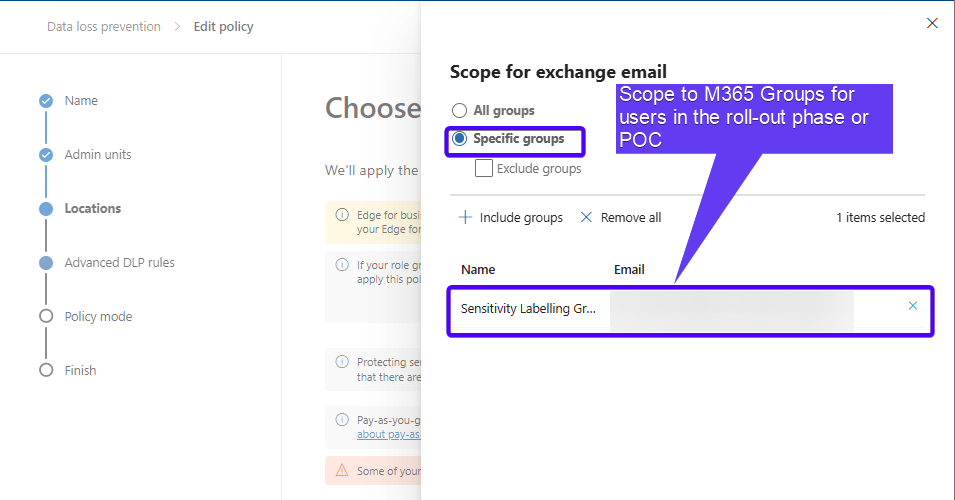
For Rollout Users
Using M365 Groups to scope roll outs, include them in the policy that governs good label usage, and applied Purview’s Advanced Message Encryption Templates.
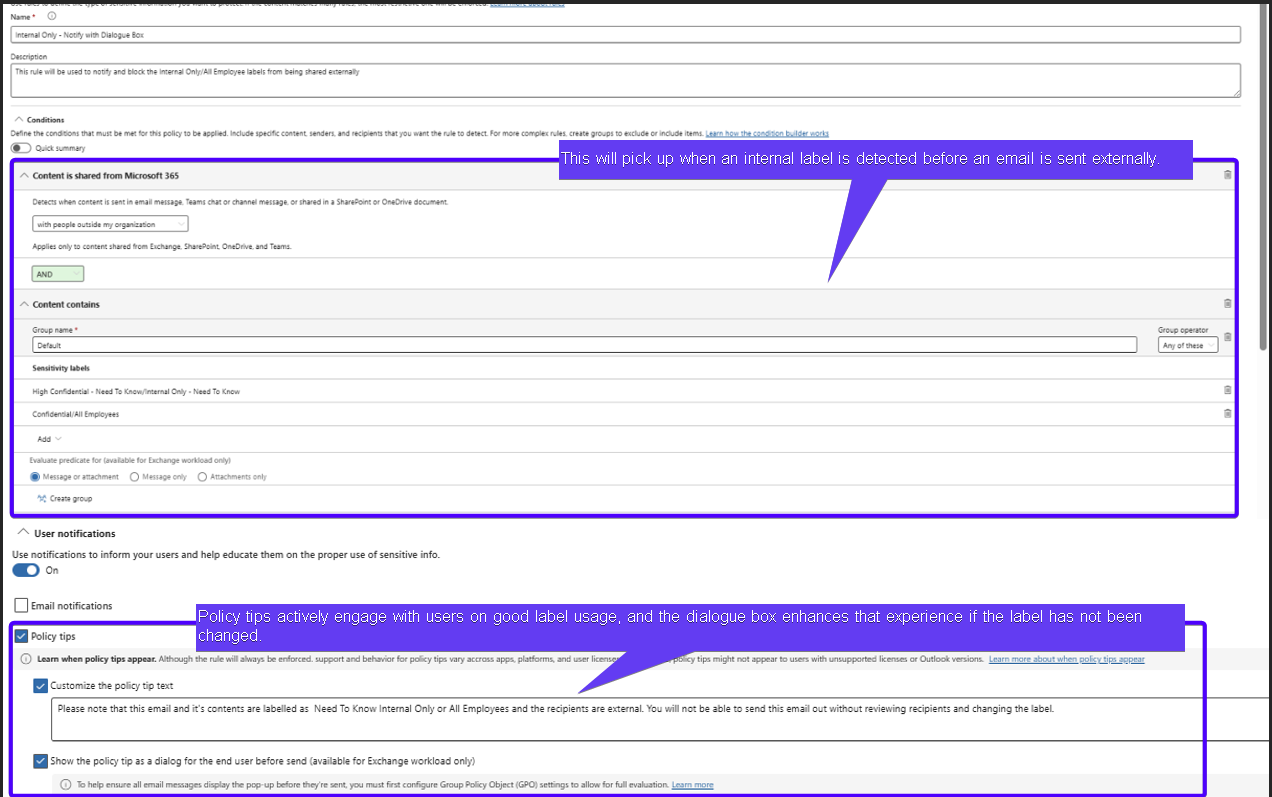
Users will have both a Policy Tip instructing them on correct label usage and a Dialogue Box with the same policy tip - visible when they click “Send”.
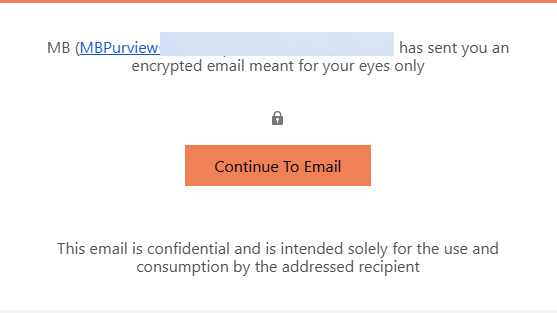
Additionally, an email that is encrypted but is sent to known vendors, external partners or customers (B2B) can receive it without needing to use an OTP (Purview Message Portal) when consuming the email.
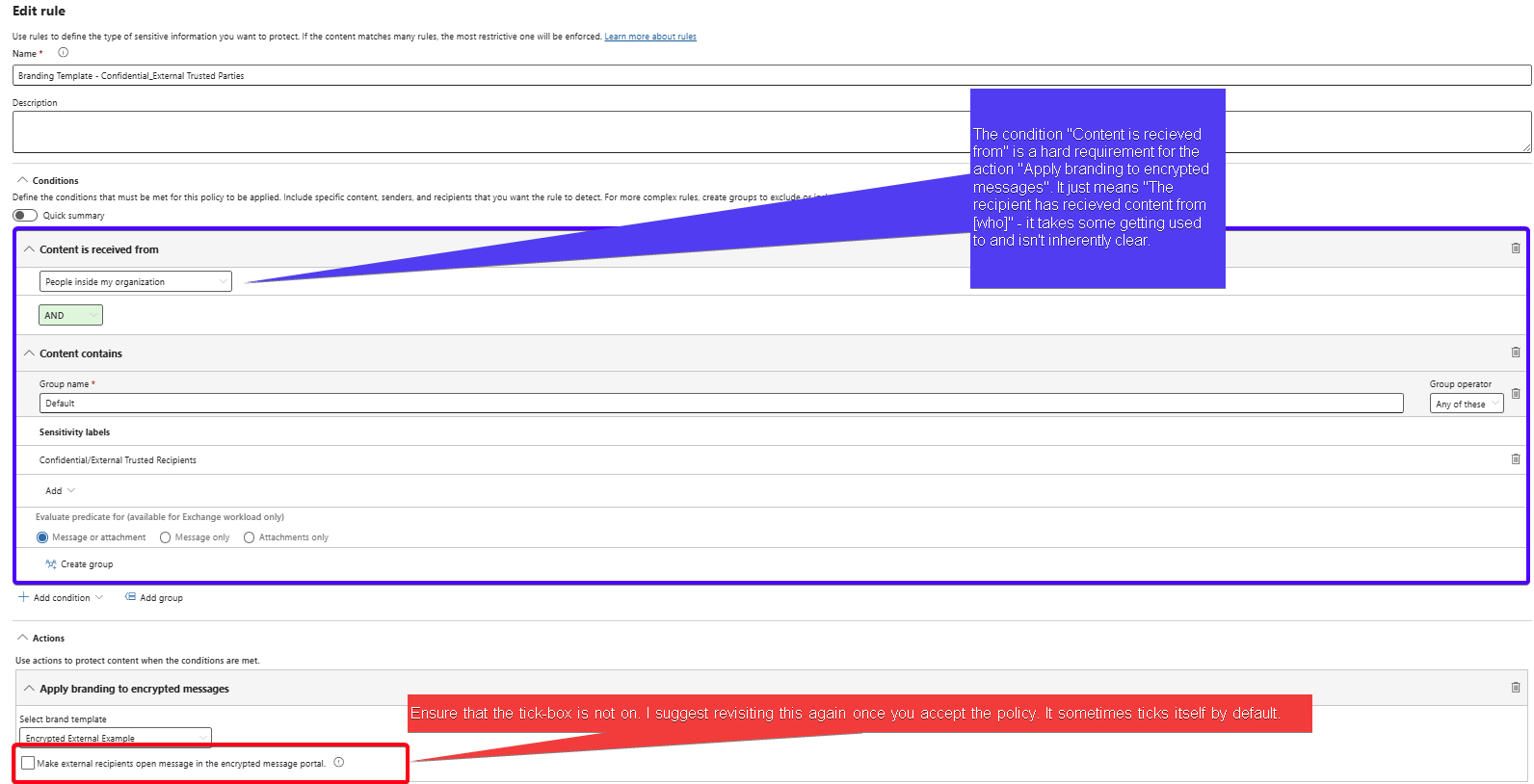
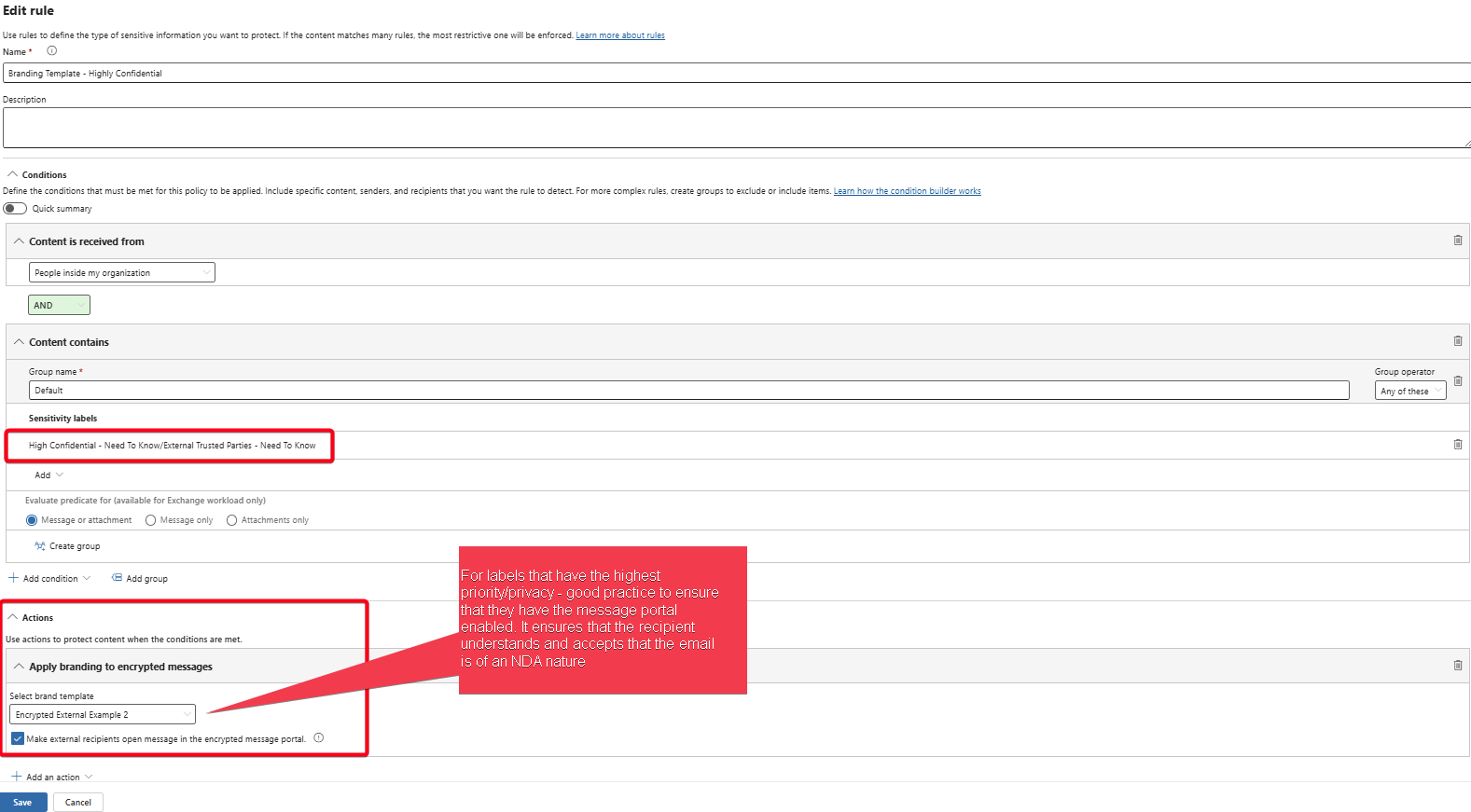
An additional rule will be created to enable and apply Encryption Branding Templates as well as instruct Microsoft Advanced Purview Message Encryption on;
The corresponding OME Configuration Template to be applied for specific labels (usually best used for highly confidential/restricted labels)
For Excluded/Non-Role Out Users
The second policy and its rules are used to ease any downstream issues that may occur, so;
It Excludes rollout users from the Scope (importance of M365 groups)
Users not in the rollout group aren’t affected by removing the OME Encryption and rights management.
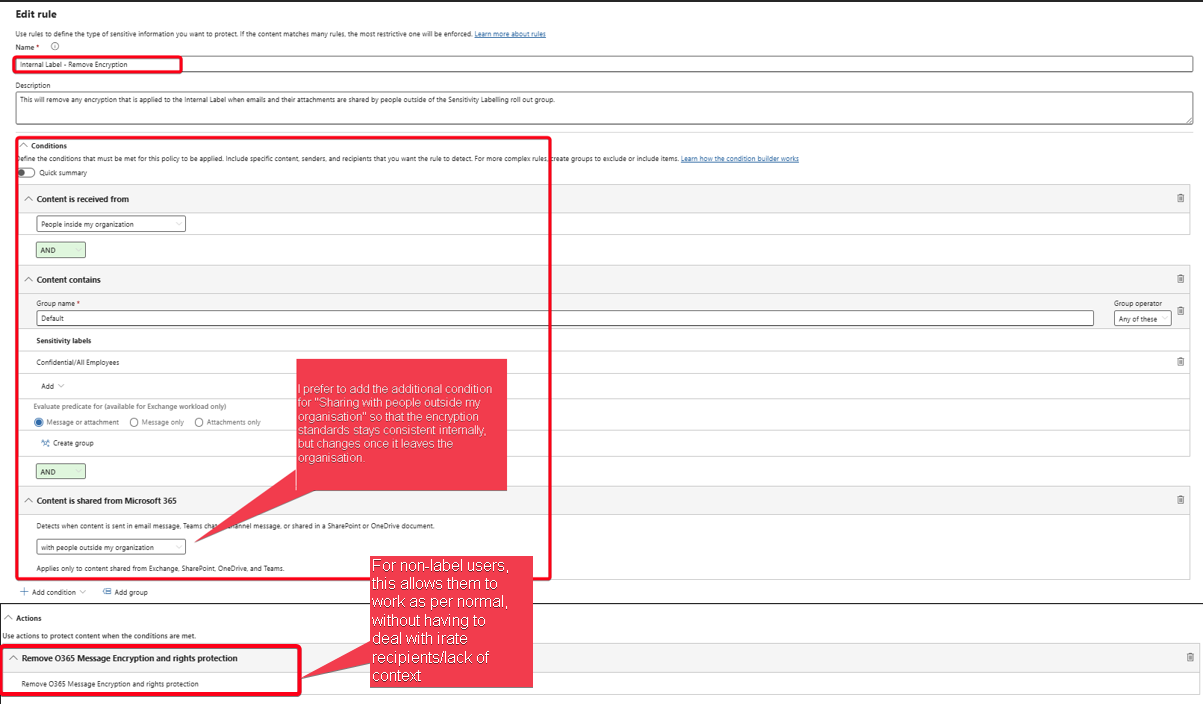
Best practice in this case is to not include any Highly Confidential/Restricted label - the thinking here, is that there is an inherent NDA/For your eyes only expected.
This all culminates in a configuration-heavy, yet training, roll-out, and friction-free implementation of sensitivity labels.
The relevant training stakeholders worry only about discussing how labels work, and when to apply encryption for exception - while not having to worry about the experience of users not yet included - allowing for business to continue as per normal, while ensuring data is more secure today than it was yesterday.
Ultimately, the goal is to root conversations about data security and compliance in security principles, empower users to apply these controls effectively, and help stakeholders see how labels enhance workflows—similar to MFA and Conditional Access.
A lot of these are my own personal best practices, and you might find that this is either too complicated, or makes total sense. Please reach out to me if you’d like more clarity or share how you’ve gone about implementing Secure Sensitivity Labels in your organisation.